🐳 Docker Compose – Day 7 : Complete Detailed Notes
Managing Multi-Container Applications with Docker Compose

Cloud & DevOps enthusiast learning in public ☁️⚙️ Documenting my journey through systems, automation, and real-world engineering problems. Focused on fundamentals, practical learning, and continuous growth.
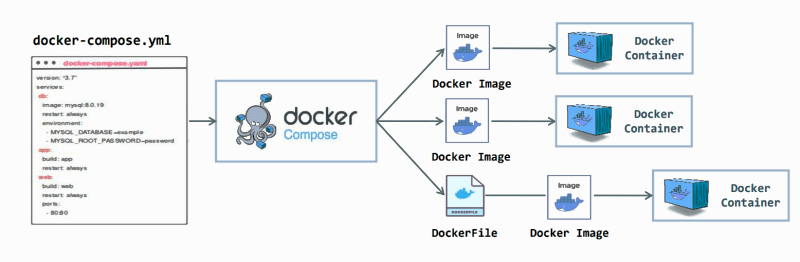
Docker Compose is a game-changer for managing multi-container Docker applications. Instead of manually running multiple docker run commands, Compose allows you to define, manage, and orchestrate containers using a single YAML file.
📷 Single YAML file managing multiple containers
1️⃣ What is Docker Compose?
Docker Compose is a tool used to define and run multi-container applications with one command.
Instead of manually running containers, Compose lets you define:
Services (containers)
Networks
Volumes
✅ Compose is mainly used for:
Local development
Testing
CI environments
Small production setups
Installation
sudo apt install docker-compose -y
2️⃣ Why Docker Compose?
Without Compose, you need multiple commands:
docker run -d nginx
docker run -d mysql
docker network create app_net
docker volume create db_data
With Compose, all of this is one command:
docker compose up -d
3️⃣ Key Concepts in Docker Compose
Service – One container definition (e.g.,
web,db)Project – Group of services; project name defaults to directory name
Compose File – YAML file (
docker-compose.yml) defining the project declaratively
4️⃣ Docker Compose File Structure
version: "3.9"

services:
  service_name:
    image:
    build:
    ports:
    volumes:
    networks:
    environment:
    depends_on:

networks:
volumes:
5️⃣ Version Field
version: "3.9"
Defines the Compose file format
Version 3+ supports Swarm features
6️⃣ Services Section (Core Options)
| Option | Purpose |
| image | Pulls an image from registry (e.g., nginx:latest) |
| build | Builds image from Dockerfile |
| container_name | Set custom container name |
| ports | Map host → container ports (e.g., "8080:80") |
| expose | Expose port internally (not accessible from host) |
| volumes | Mount named volume or bind mount |
| environment | Set environment variables |
| env_file | Load environment variables from file |
| depends_on | Control startup order (does NOT wait for readiness) |
| restart | Restart policy (always, on-failure, unless-stopped) |
| command | Override default container command |
| entrypoint | Override container entrypoint |
| working_dir | Set working directory inside container |
| healthcheck | Define health check commands |
7️⃣ Networks in Docker Compose
🔹 Default Network
services:
  web:
    image: nginx
  db:
    image: mysql
Docker automatically creates:
projectname_defaultServices communicate via service names
🔹 Custom Network
networks:
  app_net:

services:
  web:
    networks:
      - app_net
8️⃣ Volumes in Docker Compose
🔹 Named Volume
volumes:
  db_data:

services:
  db:
    volumes:
      - db_data:/var/lib/mysql
Persistent data stored outside container filesystem
Safe for production
9️⃣ Docker Compose Commands (Important)
| Command | Purpose |
docker compose up | Start services |
docker compose up -d | Start services in detached mode |
docker compose down | Stop and remove containers |
docker compose down -v | Stop and remove containers + volumes |
docker compose build | Build images |
docker compose ps | View running containers |
docker compose logs | View logs |
docker compose logs -f | Follow logs in real-time |
docker compose exec web bash | Execute command inside a container |
docker compose restart | Restart services |
docker compose pull | Pull updated images |
docker compose stop | Stop containers without removing |
docker compose rm | Remove stopped containers |
🔟 Complete Industrial Example – Python + Flask + MySQL
docker-compose.yml
version: "3.9"

services:
  web:
    build: .
    ports:
      - "5000:5000"
    depends_on:
      - db
    environment:
      DB_HOST: db
    volumes:
      - .:/app
    networks:
      - app_net

  db:
    image: mysql:8.0
    environment:
      MYSQL_ROOT_PASSWORD: root
      MYSQL_DATABASE: appdb
    volumes:
      - db_data:/var/lib/mysql
    networks:
      - app_net

volumes:
  db_data:

networks:
  app_net:
    driver: bridge
Dockerfile
FROM python:3.11-slim
WORKDIR /app
COPY requirements.txt .
RUN pip install -r requirements.txt
COPY . .
CMD ["python", "app.py"]
Start the Containers
docker compose up -d


